Browser Extension for Color & Accessibility
Every colour tool, one coherent workspace
Home and four focused spaces bring eighteen tools together — colour, contrast, accessibility, inspection and code — on whatever page you are viewing. Search with one shortcut, work in the popup or side panel, and keep everything on your machine.
Store listings
Previous releaseReviewed, signed and they keep themselves updated.
ZIP packages
1.0.2 · NewAuric Studio and Hindi, available now. Download
Edge, Brave, Opera, Vivaldi and Arc install from the Chrome listing. Safari: convert the ZIP.
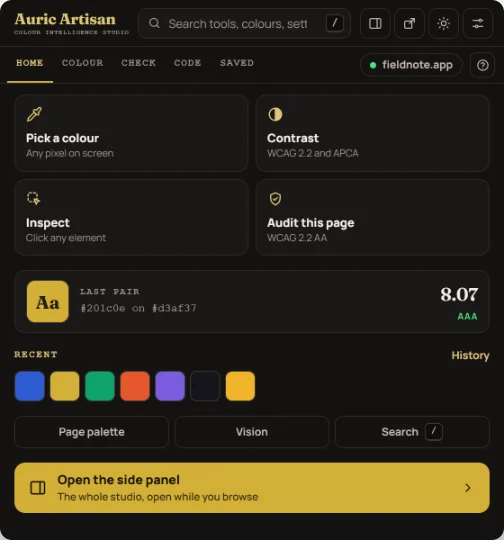
- Search tools, colours and settings
- Home and four spaces
- One-click actions for this page
- Hand off to the side panel
Captured from 1.0.2
-
18
tools in one popup
-
80
accessibility rules, across 32 WCAG success criteria
-
12
vision simulations you can view the live page through
-
4
packages — Chrome, Edge, Opera and Firefox
-
2
interface languages — English and हिन्दी
-
0
network calls, and no telemetry
Eighteen tools
One popup, not eighteen extensions
Home plus Colour, Check, Code and Saved replace the old command grid. Every tool still ships in the same build: no upgrade, second install or cut-down edition.
Home
The first thing the popup shows: one-click actions for the page you are on, the last pair you checked, recent colours, and a way back to whatever you were doing.
On Home
- Colour of the day
- Page actions
- Recent colours
- Continue
- Pinned tools
- Pick a colour, Contrast, Inspect and Audit this page, one click each
- Press / or Ctrl K to search every tool, setting and page
- Open the side panel to keep the whole studio beside the page
Colour
Version 1.0.2 brings the website's colour picker into the extension and expands it: twelve formats, contrast, colour-vision previews and production-ready code all live beside the same colour.
Tools in this space
- Picker
- Page palette
- Image
- Gradient
- Mix
Also inside: Harmony, Scale and Convert
- HEX, RGB, HSL, HSV, HWB, CMYK, LAB, LCH, OKLAB, OKLCH, XYZ and Display P3
- Harmonies, an eleven-step OKLCH scale and sRGB or P3 chroma guidance
- Copy CSS, wide-gamut CSS, Tailwind v4, SwiftUI, Compose or Android code

Check
Check any pair with WCAG 2.2 and APCA, then move to the nearest passing colour in one click. For live elements, the Inspector reads the real computed backdrop through stacked translucent layers instead of assuming white.
Tools in this space
- Contrast
- Vision
- Audit
- Findings
- WCAG 2 ratios with AA and AAA verdicts for text and non-text
- APCA lightness contrast alongside them
- The closest AA colour, plus suggestions that keep the character of your brand

Code
Inspect any element. Hover for a light read-out, then click to pin the full card away from the element. Contrast leads; box model, layout, colours, typography, accessibility and CSS follow in seven sections with useful summaries.
Tools in this space
- Inspect
- Tokens
- Snippets
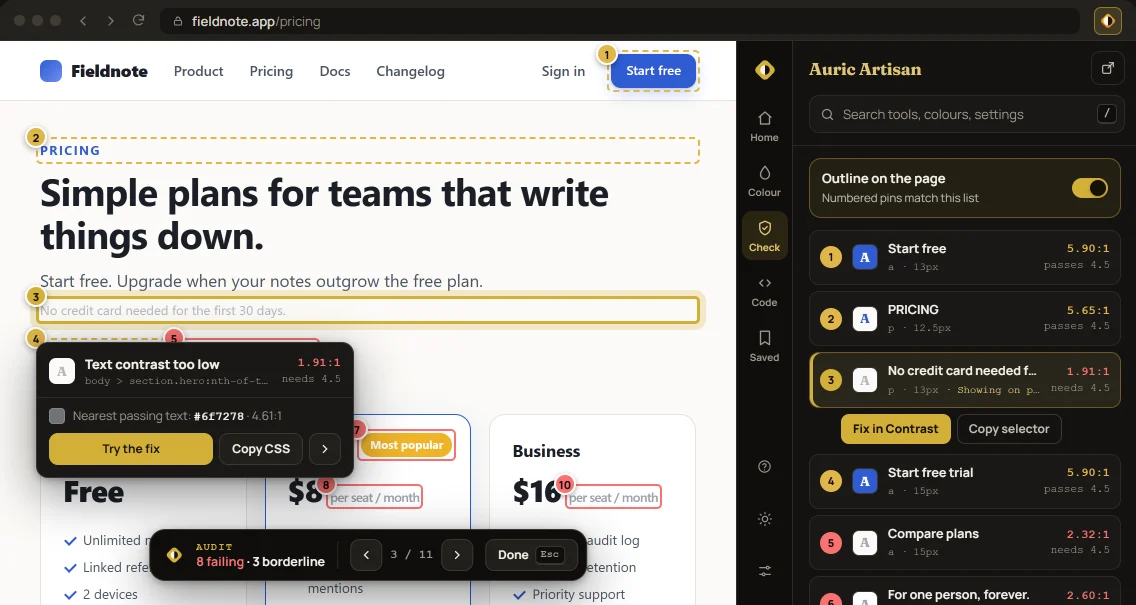
- An “Aa” sample, ratio, pass badges and the nearest passing text colour
- A real box-model diagram, transitions, shadows, type, colour and layout
- Accessibility problems explained with a concrete fix

Saved
What you keep stays in the browser's local extension storage: colours, palettes, picks and snippets never leave the machine.
Tools in this space
- Library
- History
- On the web
- Library
- 500 colours and your saved palettes
- History
- Your last 50 picks
- On the web
- The site's Analyzer, palette libraries and colour labs, one click away
Side panel
Keep the whole workspace beside the page
Dock Auric Studio beside the page and leave it open while you browse. It follows the active tab and drives the same picks, pins, audits and Inspector you use from the popup.
- Home keeps page actions, colours and recent work within reach
- All four spaces reflow into a narrow, persistent layout
- Continue picks up the last tool exactly where you left it

Accessibility
A real audit, not a contrast checker
Scan runs 80 rules over the live DOM and files what it finds by severity, with the WCAG success criterion attached to each. The ARIA checks are driven by the ARIA 1.2 matrix and the HTML-AAM mapping rather than by guesswork, so "this attribute is not allowed on this role" is a lookup, not a heuristic.
Findings you can act on
- Each finding names the rule, the criterion and the element it came from
- Four severities — critical, serious, moderate, minor
- Click a finding to outline the element on the page
- Runs off the main thread, so a big page does not freeze while it scans
What the 80 rules check
Eight families, across 32 WCAG success criteria
-
ARIA
Role validity, attribute support per role, value parsing, required attributes, required parent and child roles, broken references, focusable
aria-hidden -
Names
Missing and whitespace-only accessible names, visible label contained in the name, non-descriptive link text, identical links with different destinations
-
Structure
Heading order and empty headings, landmarks and duplicates, list and definition list structure, table headers, duplicate ids, content outside landmarks
-
Forms
Labels and broken
fortargets, placeholder used as a label,autocompletevalidity, radio grouping, required marking, error message association -
Media
Image, area and image-button alt text, meaningful and decorative SVG, captions and audio description, audible autoplay, frame titles
-
Keyboard
Positive
tabindex, controls that cannot be focused, removed focus indicators, 24 × 24 target size, off-screen elements still in the tab order, nested interactives -
Contrast
Text contrast at AA and AAA, non-text and control boundary contrast, links distinguished by colour alone
-
Document
Page language and validity, title and how descriptive it is, zoom suppression, skip link, locked text spacing, timed refresh, unpausable motion,
prefers-reduced-motion
Details
Also in the box
-
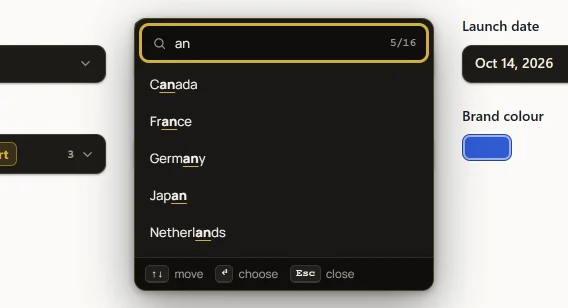
Universal form pickers
Thirteen switches cover dropdowns, multi-select, date, time, number, range and colour. Long lists gain search, while “Leave designed controls alone” preserves a site's own UI.
-
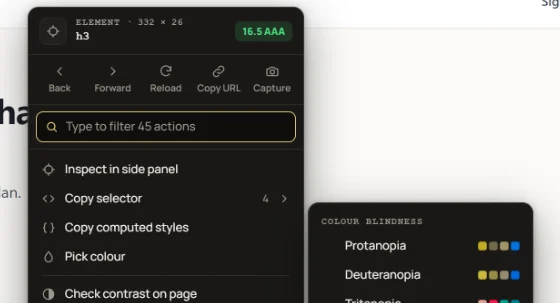
A menu that knows what you clicked
Relevant actions come first, a quick bar holds the actions you pin, and typing filters everything. Shift + right-click always opens the browser's own menu.
-
Search everything
Press / or Ctrl K to search tools, settings, actions and auricartisan.com pages, with exact title matches placed first.
-
Sealed off from the page
Everything injected lives in a closed shadow root, so a site's CSS cannot reach into the picker or the inspector — and the extension cannot disturb the site's layout.
-
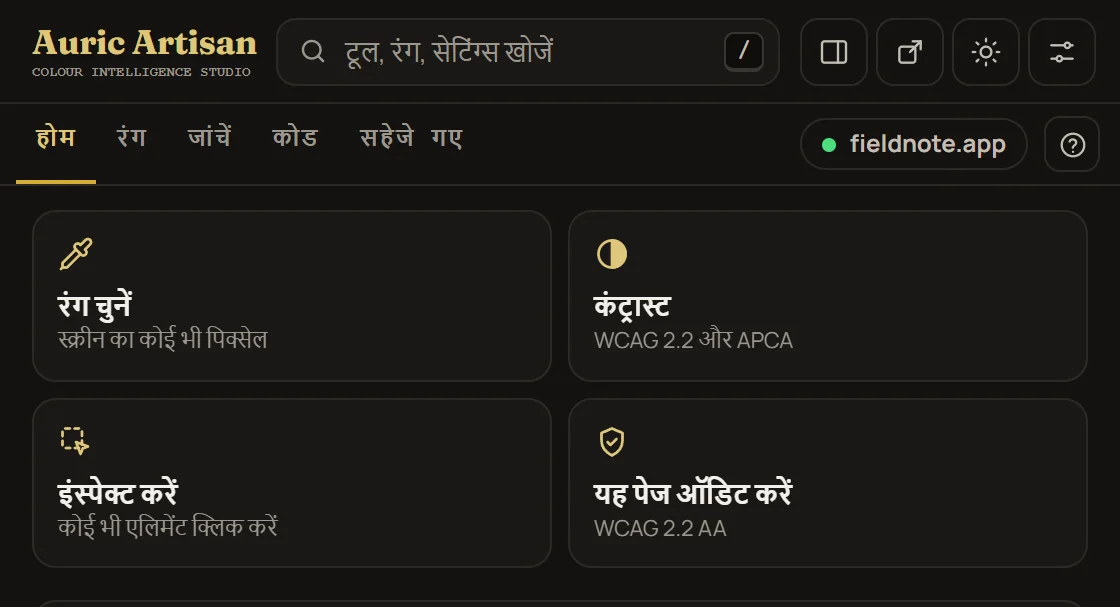
English and हिन्दी
The popup, the side panel, the injected menus and every accessibility finding switch language together — and the calendar's month and day names follow.
-
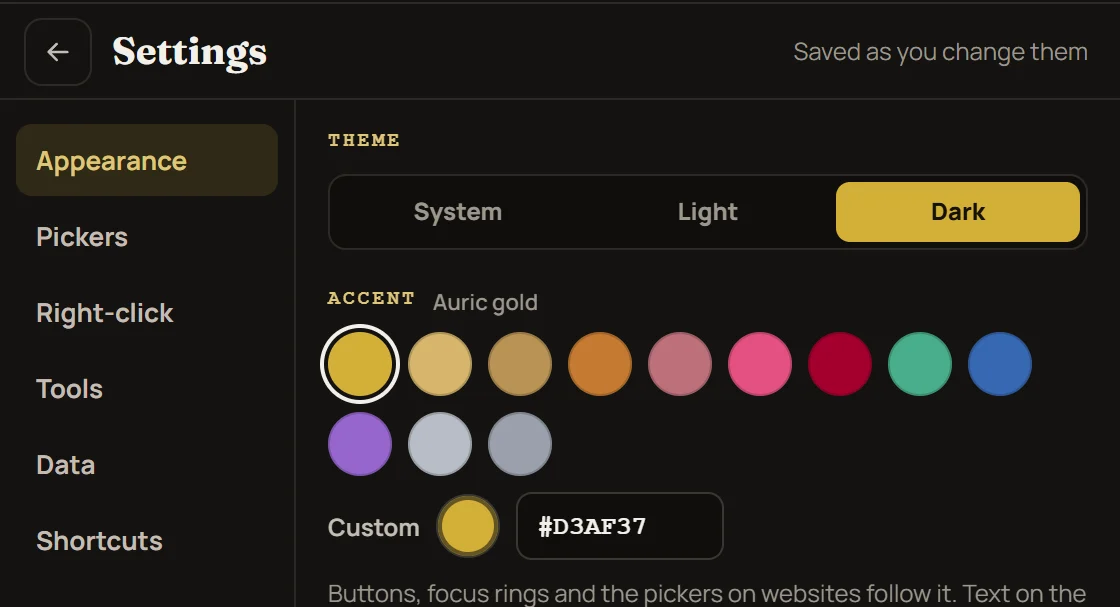
Settings that read like settings
Appearance, Pickers, Right-click, Tools, Data and Shortcuts live in a two-pane view. Changes save as you make them and reach every extension surface.
Permissions & privacy
What it asks for, and why
Installing this shows a prompt saying Auric Artisan can read and change your data on all websites. That is a real permission and it is worth understanding before you accept it, so here is exactly what is declared and what is done with it.
Nothing is sent anywhere
No analytics, no accounts, no remote calls. Everything you pick, scan or save is written
to your browser's local extension storage and never leaves the machine. The Firefox
package states this to Mozilla formally, as required data collection of
none.
-
Access to every site
The tools work on whatever page you are looking at, and the extension cannot know in advance which sites those will be — so the manifest declares all of them. There is no narrower honest version of this permission for a tool whose whole job is inspecting arbitrary pages.
-
A script on every page
A small content script loads on each page you visit and then waits. Until you invoke a tool it registers a listener and does nothing else — it does not read your content, and it does not change the page.
-
Changing a page is opt-in
Everything that modifies a site — the custom form pickers, the replaced colour input, the custom right-click menu — ships switched off. Each is a toggle in the popup, because rewriting someone else's page should be your decision.
Manifest permissions
Asked at install, or only when a feature first needs them
| Permission | When | What it is for |
|---|---|---|
<all_urls> |
At install |
Lets the tools run on whatever page you are on |
activeTab |
At install |
Acts on the tab you are actually looking at when you invoke a tool |
scripting |
At install |
Injects the picker, inspector and audit on demand |
storage |
At install |
Keeps your history, palettes, snippets and settings — locally |
clipboardWrite |
At install |
Copies a colour, token or snippet when you ask for it |
contextMenus |
At install |
Adds the extension's own entries to the right-click menu |
sidePanel |
At install · Chromium only |
Lets the workspace dock beside the page instead of hanging from the toolbar.
Firefox reaches the same panel through sidebar_action, which is not
a permission — so the Firefox build asks for five, not six |
clipboardRead |
On request |
Pasting a colour in — asked for the first time you do it |
downloads |
On request |
Saving an export or a screenshot to disk |
sessions |
On request |
Restoring your workspace across browser restarts |
Read it yourself
An unpacked extension is just a folder. The manifest is
manifest.json at the top; the script that runs on pages is
content.js beside it. Both are plain, unminified files.
Install
Two stores, or the ZIP
The store listings are reviewed, signed and keep themselves updated; they currently serve the previous release. Version 1.0.2 is available now in the ZIP packages below for anyone who wants the new workspace immediately or prefers to load the folder themselves.
-
Chrome Web Store Previous release
Chrome & Chromium
Chrome, Edge, Brave, Opera, Vivaldi and Arc all install from this one listing — every Chromium browser accepts it, and none of them need a separate store. Updates arrive on their own.
- One click, no developer mode, survives a restart
- Google reviews each version before it ships
Also as edge and opera archives — byte-identical, named for their stores
-
Firefox Add-ons Previous release
Firefox
A genuinely different package: the Gecko background format, its own add-on id, and the data-collection disclosure Mozilla has required since Firefox 140 — declared as
none, which is the truth.- Signed by Mozilla, so it installs permanently
- Reviewed against the disclosure it declares
The ZIP loads as a temporary add-on until you quit; the store listing is the one that persists.
-
Converter macOS + Xcode
Safari
Safari takes web extensions through an Xcode project rather than a ZIP. Unzip the Chromium package, run Apple's converter against the folder on macOS, then build and run what it generates.
xcrun safari-web-extension-converter ./auric-suite-chrome-1.0.2
If you would rather not use a store
From either store this is one click and you can skip this section entirely. The manual path is here because an unpacked extension is a folder you can read before you trust it — and because browsers do not let a website open their internal extension pages, so step two is a copy-and-paste rather than a link.
-
Download and unzip
Take the package for your browser from above and unzip it somewhere permanent — the browser loads the extension from that folder every time it starts, so it cannot live in Downloads if you clear that out.
-
Open the extensions page
Paste the address for your browser into the address bar.
chrome://extensionsabout:debugging#/runtime/this-firefox -
Load it
On Chromium, turn on “Developer mode”, then “Load unpacked” and choose the unzipped folder. On Firefox, choose “Load Temporary Add-on” and select the
manifest.jsoninside it — which lasts until you quit, because Firefox only keeps signed add-ons across restarts. The store listing is the one that persists. -
Pin it
Pin Auric Artisan to the toolbar, then click the icon or press Alt + Shift + A. It docks to the browser's side panel too, if you would rather keep it open beside the page.
Keyboard shortcuts
Change any of them in your browser's shortcut editor
-
Alt + Shift + A
Open the extension on the active tab
-
Alt + Shift + C
Open the contrast checker
-
Alt + Shift + E
Extract the page palette
-
Alt + Shift + V
Toggle the deuteranopia simulation
-
Unassigned
Inspect an element — set a key in your browser's shortcut editor
-
Unassigned
Run a full accessibility audit — set a key in your browser's shortcut editor
Questions
Before you install
Everything else, from the first pick to exporting an audit, is in the user guide.
Where do I install it from?
The Chrome Web Store or Firefox Add-ons. Both listings are reviewed and signed, but currently serve the previous release. The ZIP links above provide version 1.0.2.
Edge, Brave, Opera, Vivaldi and Arc all install from the Chrome listing; there is no separate store for any of them.
What is the difference between the Chrome, Edge and Opera ZIPs?
Nothing at all — they are byte-identical copies of the same Chromium package, named for their store so an upload is never ambiguous. Take any one of them for any Chromium-family browser.
Firefox is different: a separate build with the Gecko background format, its own add-on id and Mozilla's data-collection disclosure.
Why does it need access to all websites?
Because the tools work on whatever page you are looking at, and the extension has no way to know in advance which sites those will be. A narrower permission would mean a tool that only works on a list of sites chosen ahead of time.
What is done with that access is deliberately small: a script loads on each page and stays inert until you invoke a tool, and every feature that changes the page itself is off until you switch it on.
Does it slow pages down?
The script that loads on each page registers a listener and stops there — no scanning, no observers, no work until you ask for something. The accessibility audit is the expensive part, and it only runs when you start it, off the main thread so the page stays responsive while it works.
Does it survive a Firefox restart?
From Firefox Add-ons, yes — it is signed, so it installs permanently like any other add-on.
The ZIP loaded through Load Temporary Add-on does not, and that is Firefox's rule for unsigned add-ons rather than a limitation of this one. If you are reinstalling it every morning, use the store listing.
Do I need an Auric Artisan account?
No. There is no sign-in anywhere in the extension and no account to create. It does not talk to this website, or to anything else.
Auric Artisan for the browser
Add it to your browser
No account, no telemetry, and every tool in the same build.