Accessibility pattern · Navigation

Table of contents

Each link jumps to its section and moves focus to the section's heading, so the next key press carries on from there. As you scroll, an IntersectionObserver marks the section you are reading with aria-current="true", shown with a bar and weight as well as color.

WCAG criteria
7
Keyboard rules
5
Checked with
axe, keyboard and the inspector

Live demo

Try it

Use it with a mouse, a keyboard or a screen reader. The inspector beside it shows what the browser tells assistive technology as you go: focus, state changes and announcements.

Monsoon treks in the Sahyadris

From June to September the Western Ghats turn green and every fort trail fills with waterfalls. Here is how to plan a safe first trek.

When to go

The rains arrive in early June and ease off by late September. July and August bring the heaviest rain, so many first-timers choose late June or September.

Weekends are crowded on the popular forts. If you can, go on a weekday and start before sunrise.

Choosing a route

Start with a well-marked fort trail of three to four hours, such as Lohagad or Rajmachi. Leave ridge walks and waterfall rappelling for later.

Check the last bus or train back before you set out, and plan to be off the hill by four in the afternoon.

What to pack

Shoes with a deep grip matter more than anything else. Add a light rain jacket, dry socks in a plastic bag and two litres of water.

Pack food that survives the damp: dry fruit, chikki and theplas. Keep your phone in a zip bag.

Staying safe

Do not cross a stream that reaches your knees; the water rises fast after rain upstream. Stay on the trail when the mist rolls in.

Tell someone at home your route and when you expect to be back. Save the local police and forest office numbers before you lose signal.

Getting there

Most trails near Pune and Mumbai start close to a station on the Mumbai–Pune line, where local trains run often on weekend mornings.

Shared jeeps wait in the base villages for the last stretch. Agree on the fare before you get in.
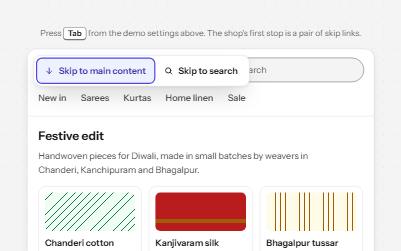
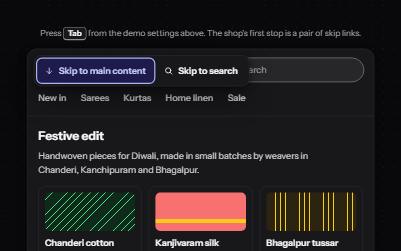
The demo works without JavaScript only as far as its HTML does; the inspector needs JavaScript.

Keyboard

Keys it answers to

Every action works without a pointer.

KeyWhat it does
TabMoves to the scroll area, then through the contents links; on a phone, to the On this page button first.
EnterOn a contents link, scrolls to that section and moves focus to its heading.
Arrow Down or Arrow Up or Page Down or Page UpWith focus in the scroll area, scrolls the article; the contents mark the section you reach.
Enter or SpaceOn the On this page button, shown on narrow layouts, opens or closes the contents list.
EscapeCloses the open contents list and returns focus to its button.

Screen readers

What it announces

Written from the roles, names and states in the markup.

WhenExpected announcement
Tab reaches the scroll areaMonsoon treks in the Sahyadris, region
Tab reaches the first contents linkOn this page, navigation. List, 5 items. When to go, current, link
Enter on What to packWhat to pack, heading level 4
Scrolling into another sectionNothing is said; that section's link becomes current and says so when focus reaches it
On a phone, Tab reaches the buttonOn this page, When to go, button, collapsed

These are expected announcements, not recordings. Wording and order differ between screen readers and browsers.

Code

Copy the code

The exact files this demo runs on. The styles are served with a prefix that keeps this site's own styles out of the demo; what you copy is the original.

The markup

<div class="ap-toc" data-ap-toc>
  <div class="ap-toc__scroller" role="region" aria-labelledby="toc-name" tabindex="0">
    <div class="ap-toc__layout">
      <nav class="ap-toc__nav" aria-labelledby="toc-nav-label">
        <p class="ap-toc__label" id="toc-nav-label">On this page</p>
        <button type="button" class="ap-toc__toggle" aria-expanded="false" aria-controls="toc-list">
          <span class="ap-toc__toggle-text">
            <span class="ap-toc__kicker">On this page</span>
            <span class="ap-toc__now">When to go</span>
          </span>
          <svg class="ap-toc__chevron" viewBox="0 0 24 24" aria-hidden="true" focusable="false"><path d="m6 9 6 6 6-6"/></svg>
        </button>
        <ol class="ap-toc__list" id="toc-list">
          <li><a class="ap-toc__link" href="#toc-when" aria-current="true">When to go</a></li>
          <li><a class="ap-toc__link" href="#toc-route">Choosing a route</a></li>
          <li><a class="ap-toc__link" href="#toc-pack">What to pack</a></li>
          <li><a class="ap-toc__link" href="#toc-safe">Staying safe</a></li>
          <li><a class="ap-toc__link" href="#toc-travel">Getting there</a></li>
        </ol>
      </nav>

      <article class="ap-toc__article">
        <h3 class="ap-toc__name" id="toc-name">Monsoon treks in the Sahyadris</h3>
        <p class="ap-toc__intro">From June to September the Western Ghats turn green and every fort trail fills with waterfalls. Here is how to plan a safe first trek.</p>

        <h4 class="ap-toc__part" id="toc-when" tabindex="-1">When to go</h4>
        <p>The rains arrive in early June and ease off by late September. July and August bring the heaviest rain, so many first-timers choose late June or September.</p>
        <p>Weekends are crowded on the popular forts. If you can, go on a weekday and start before sunrise.</p>

        <h4 class="ap-toc__part" id="toc-route" tabindex="-1">Choosing a route</h4>
        <p>Start with a well-marked fort trail of three to four hours, such as Lohagad or Rajmachi. Leave ridge walks and waterfall rappelling for later.</p>
        <p>Check the last bus or train back before you set out, and plan to be off the hill by four in the afternoon.</p>

        <h4 class="ap-toc__part" id="toc-pack" tabindex="-1">What to pack</h4>
        <p>Shoes with a deep grip matter more than anything else. Add a light rain jacket, dry socks in a plastic bag and two litres of water.</p>
        <p>Pack food that survives the damp: dry fruit, chikki and theplas. Keep your phone in a zip bag.</p>

        <h4 class="ap-toc__part" id="toc-safe" tabindex="-1">Staying safe</h4>
        <p>Do not cross a stream that reaches your knees; the water rises fast after rain upstream. Stay on the trail when the mist rolls in.</p>
        <p>Tell someone at home your route and when you expect to be back. Save the local police and forest office numbers before you lose signal.</p>

        <h4 class="ap-toc__part" id="toc-travel" tabindex="-1">Getting there</h4>
        <p>Most trails near Pune and Mumbai start close to a station on the Mumbai–Pune line, where local trains run often on weekend mornings.</p>
        <p>Shared jeeps wait in the base villages for the last stretch. Agree on the fare before you get in.</p>
      </article>
    </div>
    <div class="ap-toc__end" aria-hidden="true"></div>
  </div>
</div>

WCAG 2.2

What it meets

The success criteria this pattern takes care of, and how.

  • 1.3.1 Info and Relationships Level A

    The contents are an ordered list in a nav named On this page, and every section starts with a real heading.

  • 2.1.1 Keyboard Level A

    The scroll area takes focus, so it scrolls with the arrow keys, and every link and button works from the keyboard.

  • 2.4.3 Focus Order Level A

    Following a link moves focus to the section heading, so reading and tabbing continue from the section, not from the contents.

  • 2.4.8 Location Level AAA

    The section being read is marked in the contents with a bar, bold text and aria-current, so you can always see where you are.

  • 2.4.11 Focus Not Obscured (Minimum) Level AA

    On phones the heading lands below the sticky contents bar instead of under it.

  • 2.3.3 Animation from Interactions Level AAA

    Jumps scroll smoothly only when the system allows motion; with reduced motion they are instant.

  • 4.1.2 Name, Role, Value Level A

    The On this page button reports expanded or collapsed, and the current link reports current.

Usage

When to use it

Use it

  • Long articles, guides and documentation with several headed sections.
  • Reference pages people scan for one part rather than read from the top.

Use something else

  • Short pages with two or three sections: the headings are enough.
  • Moving between pages: use the site navigation or a sidebar.
  • Content with no fixed order, like a feed.

Common failures

How it usually goes wrong

  • Jump links that leave focus behind

    The page scrolls but focus stays on the link, so the next Tab and the screen reader carry on from the contents. Focus moves to the heading here.

  • The current section shown by color alone

    A link that only turns blue is easy to miss. The current one here also gets a bar beside it, bold text and aria-current.

  • A scroll area the keyboard cannot reach

    A box with overflow: auto and no tabindex cannot be scrolled with the keyboard in some browsers. This one takes focus and is a named region.

  • Headings hidden under a sticky bar

    Scrolling a heading to the very top tucks it under a sticky contents bar on phones. The scroll stops short by the bar's height.

  • Work on every scroll event

    Measuring every heading on each scroll frame makes scrolling stutter. IntersectionObserver calls back only when a heading crosses the line.

  • Smooth scrolling for everyone

    Long animated scrolls can make people with vestibular disorders unwell. The jump is instant when the system asks for reduced motion.

Notes

Building it

  • On an ordinary page the links point at heading ids and the browser scrolls the window; add scroll-margin-top to the headings if a sticky header could cover them.
  • Headings have tabindex="-1" so the script can focus them without adding them to the Tab order.
  • The section being read is the last heading above a line 30% down the scroll area, and the last section takes over at the very end, so a short final section still gets its turn.
  • The section you jump to stays current while the scroll runs, and after it, even when the end of the article stops it short.
  • Below about 560 pixels the contents fold into an On this page button that also shows the current section; it closes with Escape and when focus leaves it.

Sources: MDN: Intersection Observer API · WAI-ARIA 1.2: aria-current

Checked with axe in light and dark themes, at desktop and phone widths, and by keyboard. Not yet tested with every screen reader and browser pair. Report a correction